Skip to content
B2B Solutions · Fleet management

Manage vehicle inspections for your entire fleet from one platform

AUTOTICKEET helps companies and fleet managers book, track and manage the technical inspections of their vehicles.

Simpler fleet management

  • Single and bulk bookings
  • Real-time tracking
  • QR code check-in
  • Complete inspection history
  • Alerts and notifications

Fleet management

Everything you need to run your vehicle inspections

One platform to schedule appointments, manage your vehicles, track inspections and keep your fleet's history.

Supported vehicles:Light vehicleHeavy vehicle < 15 tHeavy vehicle ≥ 15 t
  • Single bookings

    Book an inspection for a specific vehicle by choosing the center, date and an available slot. Only lanes compatible with its category are offered.

  • Bulk bookings

    Schedule inspections for several vehicles at once. Each vehicle gets its own booking and its own tracking.

  • Vehicle management

    Keep all your vehicles in one place — added one by one or imported in bulk — and see their status, appointments and inspection history.

  • Driver and operator management

    Link your drivers to vehicles and assign who brings the vehicle to each appointment. Your company remains the booking owner.

  • QR code check-in

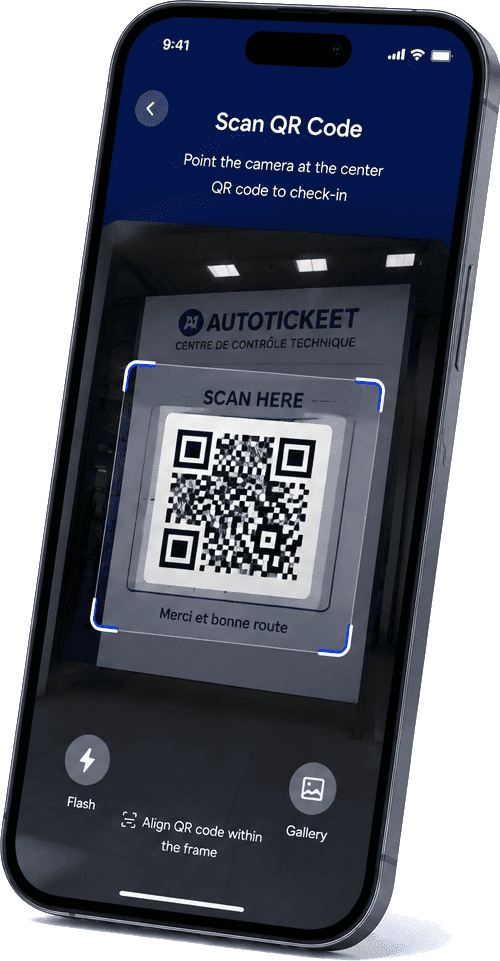
    The driver confirms their arrival by scanning the AUTOTICKEET QR code at the center. The platform then verifies the booking and their rights.

  • Real-time tracking

    See the status of your vehicles and their inspections from your management workspace.

    ConfirmedChecked inInspectingCompletedRe-inspection
  • Complete history

    Keep the inspection and re-inspection history of every vehicle. A re-inspection never overwrites the original inspection.

  • Alerts and notifications

    Follow every step in your workspace in real time. Your drivers are notified by SMS or WhatsApp of what they need to do, and you receive payments and results by email.

  • Fleet indicators

    An overview of your fleet: vehicles, drivers, upcoming appointments and vehicles to check.

  • Due dates and tracking

    Keep a clear view of each vehicle's last inspection and next due date, and spot the ones to check.

The complete journey

From booking to result, everything is tracked

Each person steps in at the right time, and every step is recorded.

Step 1

Fleet manager

  1. Selects a vehicle
  2. Chooses a center
  3. Chooses a date and slot
  4. Booking confirmed

Step 2

Driver / operator

  1. Receives the assignment
  2. Goes to the center
  3. Scans the AUTOTICKEET QR
  4. Check-in validated

Step 3

Center agent

  1. Starts the inspection
  2. Records the result

If the vehicle passes

  1. Inspection passed
  2. Completed

If repairs are needed

  1. Repairs required
  2. New re-inspection date
  3. New linked booking
  4. Check-in
  5. Re-inspection
  6. Final result

A re-inspection never replaces the original inspection

It creates a new booking linked to the original one. Both results remain visible in the vehicle's history.

Your management workspace

A clear view of your entire fleet

Find your vehicles, drivers, appointments and the status of every inspection on a single dashboard.

Swipe to see the full dashboard

  • Vehicles and drivers
  • Upcoming appointments
  • Status of every inspection
  • Vehicles to check

Per-vehicle management

Every vehicle keeps its own history

Follow each vehicle's journey: details, next inspection, assigned driver and complete inspection history.

  • Vehicle record: plate, category and driver
  • Last inspection and next due date
  • Inspection and re-inspection history
  • Every re-inspection stays linked to the original inspection

RENAULT CLIO

48213-A-6 · Light vehicle

Demo
Next inspection
September 12, 2026
Center
Tangier inspection center
Driver
Y. Amrani

Inspection history

  1. 12/09/2025

    Original inspection

    Repair required

  2. 20/09/2025

    Re-inspection

    Passed

    Linked to the 12/09/2025 inspection
Drivers and operators

Your drivers stay connected to the process

The manager schedules, the driver goes to the center, and everyone sees what concerns them.

  1. 1The manager schedules the appointment and assigns the driver.
  2. 2The driver receives the assignment: vehicle, center, date and slot.
  3. 3They go to the center with the vehicle.
  4. 4They check in by scanning the center's QR code.
  5. 5Once validated, the center agent can start the inspection.
  6. 6The manager follows every step through to the result.

A secure check-in

  1. Driver
  2. QR scan
  3. Center identified
  4. Booking validated
  5. Checked in

The QR code only identifies the center — on its own it grants no authorization. AUTOTICKEET verifies the user, booking, vehicle, center, date, check-in window and the person's rights: the assigned driver or the fleet manager.

Bulk bookings

Schedule several inspections more easily

When several vehicles need an inspection, AUTOTICKEET lets the fleet manager organize the bookings from one central place.

Each vehicle keeps:

  • Its own booking
  • Its own status
  • Its own check-in
  • Its own result
  • Its own history

Grouping only helps you organize bookings — it never replaces individual bookings. Every vehicle is checked against the chosen lane, and an incompatible batch is never half-created.

Benefits

Why fleet managers use AUTOTICKEET

  • Less admin time

    Book, track and find your inspections in one place — no chasing, no spreadsheets to maintain by hand.

  • More visibility

    See where each vehicle stands at any time: appointment, arrival, inspection and result.

  • Better vehicle tracking

    Spot the vehicles to check and stay ahead of upcoming due dates.

  • Centralized history

    Inspections and re-inspections stay attached to each vehicle, available at any time.

Run your vehicle inspections more simply

Bring your fleet, bookings and inspection tracking together in a single solution.