Skip to content
For drivers

A simple, fast experience, from booking to inspection

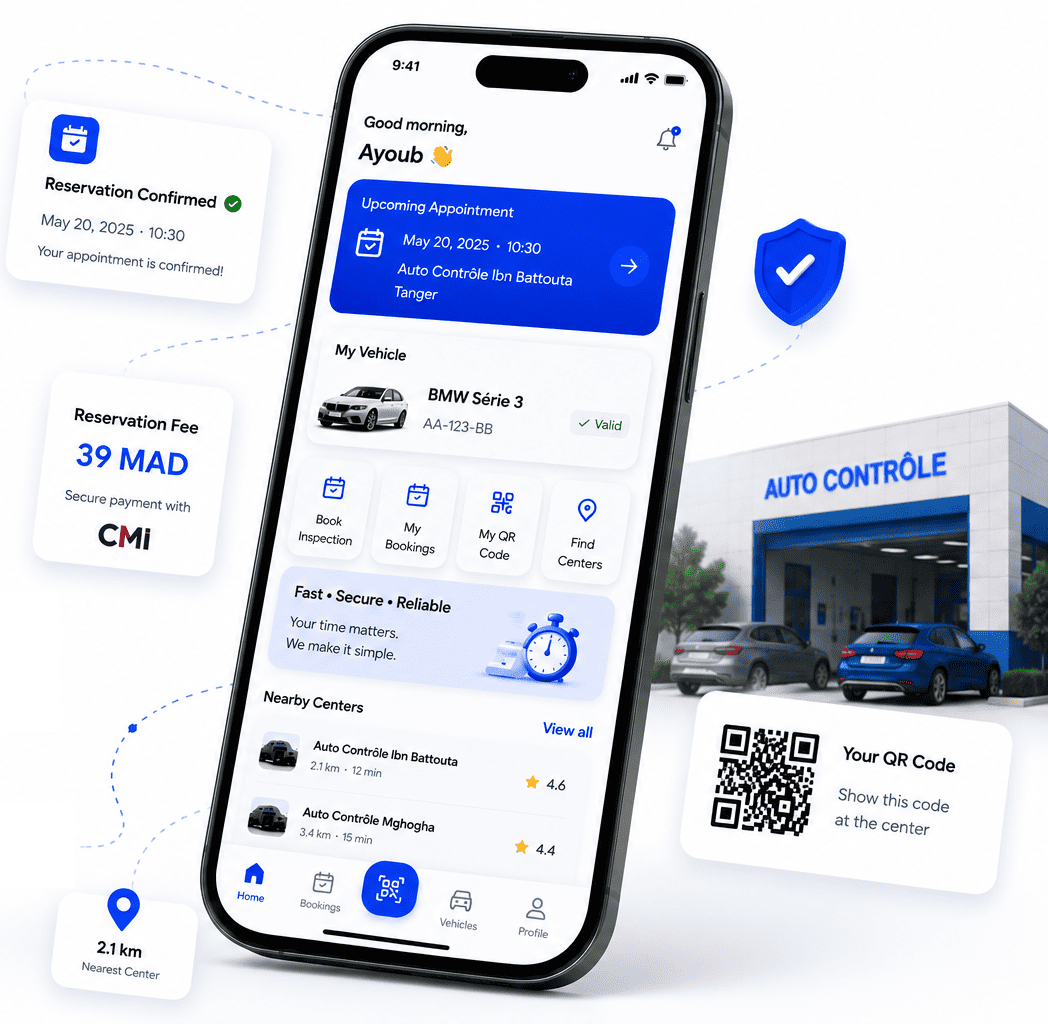
With AUTOTICKEET, book your vehicle inspection in a few clicks, track your appointment and stay informed at every step.

  • 39 MAD booking fee
  • QR code check-in
  • Secure CMI payment
AUTOTICKEET driver app: upcoming appointment, booking confirmed, 39 MAD booking fee paid via CMI and a QR code to show at the center.

Features

Everything to manage your vehicle inspection

Everything a driver needs, from their phone.

  • Online booking

    Choose your inspection center, your vehicle, your date and an available slot.

  • QR code check-in

    Arrive at the center and scan the QR code to confirm you are there before the inspection.

  • Real-time tracking

    Follow the status of your booking and your inspection from your account.

  • Notifications and reminders

    Receive important updates about your appointments and upcoming due dates.

  • Inspection history

    Find the history of your vehicles' inspections and any re-inspections.

  • Vehicle management

    Add your vehicles and quickly access their details and history.

Find a center

Easily find your inspection center

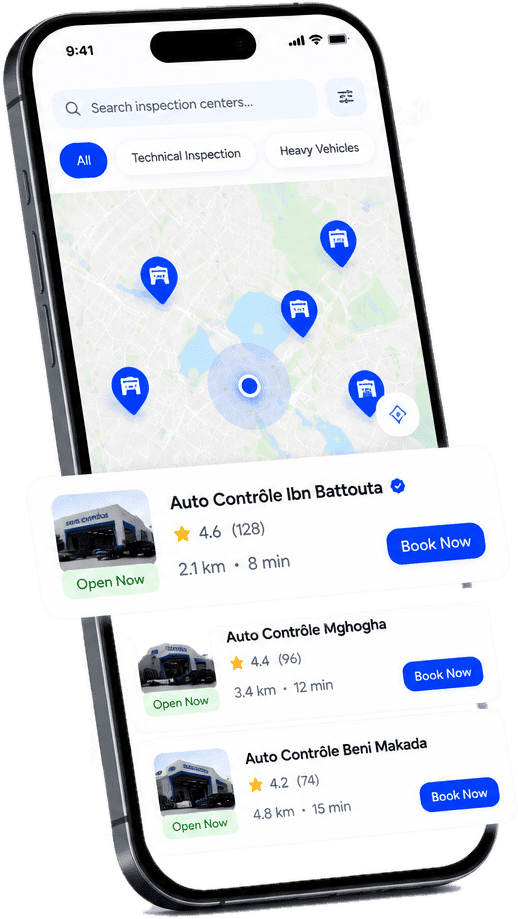
Search for an approved center near you and compare the useful details before choosing.

  • Search by name or city
  • Nearby centers, with distance
  • Real-time availability
  • Accepted vehicle categories
  • Verified driver reviews
  • Directions to the center
AUTOTICKEET app: map and list of nearby inspection centers with rating, distance and a booking button.
Center photosDemo

Vehicle inspection center

Tangier · center address

4.6

Average rating from verified reviews left after an inspection.

Opening hours
08:00 – 18:00
Break 12:30 – 14:00
Accepted vehicles
Light vehicleHeavy vehicle < 15 t
Slots availableDirections
Center profile

Get to know your center before booking

Every center has a complete profile so you know where you are going before you confirm.

  • Address, location and directions
  • Opening hours and break
  • Center photos
  • Reviews left after a completed inspection
  • Supported vehicle categories
  • Available slots

Booking

Book your slot in seconds

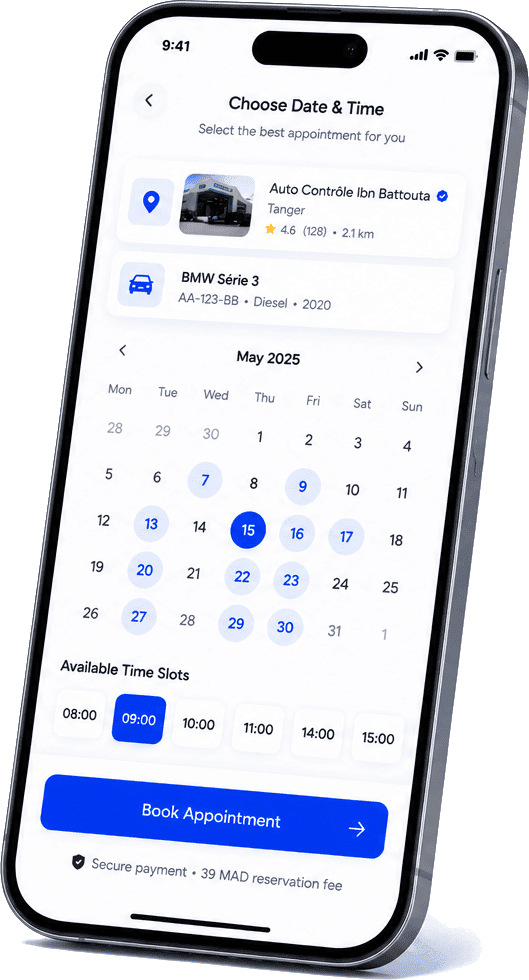
Choose your vehicle, date and slot, then review your booking before confirming.

  1. 1Center
  2. 2Vehicle
  3. 3Date
  4. 4Slot
  5. 5Review
  6. 6Confirmation

Choose your vehicle

RENAULT CLIO

Demo
Plate
12345-A-6
Type
Light vehicle
Next inspection
Sep 12, 2026

Pick a saved vehicle or add a new one.

AUTOTICKEET app: the center's calendar with available slots and the 39 MAD booking fee reminder.

The slots shown are the center's real availability.

Review before confirming

Center
Tangier
Vehicle
Renault Clio
Date
Sep 12, 2026
Time
10:30
Inspection type
Periodic inspection
AUTOTICKEET booking fee
39 MAD
Inspection price
Paid at the center
Total to pay now
39 MAD

The slot is held for you for 10 minutes while you complete the payment.

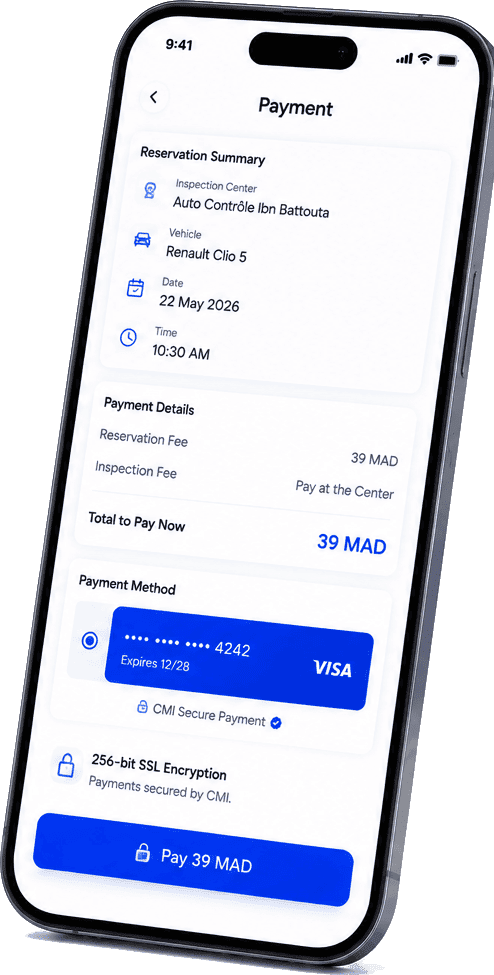
AUTOTICKEET app: payment screen with the 39 MAD booking fee, inspection paid at the center and secure CMI payment.

Payment

Simple, secure payment

You only pay the booking fee online, by bank card via CMI.

  • 39 MAD booking fee

    The inspection price itself is paid directly at the center.

  • Bank card via CMI

    Secure payment on the CMI platform.

  • Automatic confirmation

    Your booking is confirmed as soon as the payment is validated.

  • Downloadable receipt

    A PDF receipt is available in your booking details.

Payment accepted

Your booking moves to "Confirmed" and you receive a confirmation.

Payment failed

The booking is not confirmed and a clear message tells you so. No booking is ever shown as confirmed before the payment is actually validated.

You can try again while the slot is held for you.

Your booking is confirmed

ConfirmedDemo

Booking number

AT-2026-000412

Center
Tangier
Vehicle
Renault Clio
Date
Sep 12, 2026
Time
10:30

Booking QR: a random identifier with no personal data.

Check-in

Arrive at the center and check in

One scan records your arrival, and everything is verified automatically.

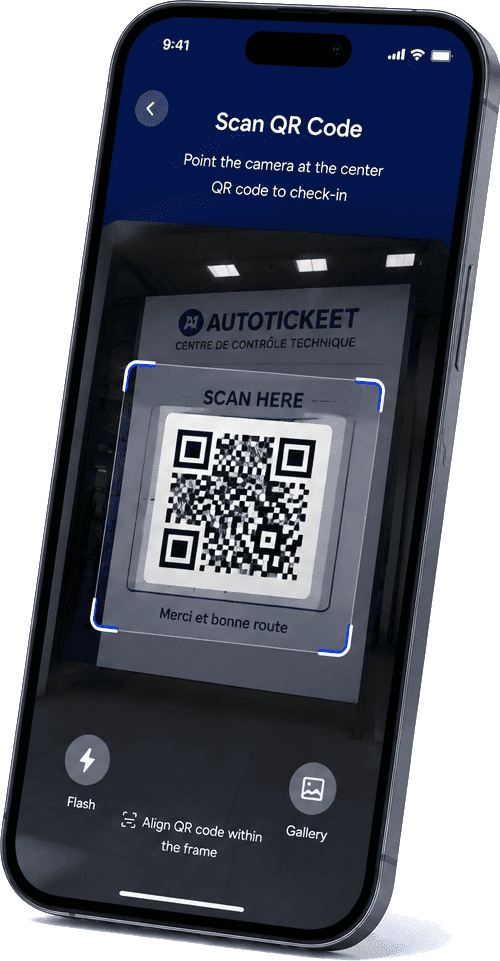
AUTOTICKEET app: the driver scans the QR code displayed at the inspection center's entrance.
  1. 1Arrive at the center.
  2. 2Scan the center's permanent QR code.
  3. 3AUTOTICKEET identifies the center.
  4. 4The system verifies your booking.
  5. 5The system verifies that you are authorized.
  6. 6Your arrival is recorded.
  1. Driver
  2. QR scan
  3. Center identified
  4. Booking verified
  5. Checked in
  6. Agent notified
  7. Inspection

At the right time

On the day of your appointment, from one hour before your slot until 45 minutes after.

One permanent QR per center

Each center displays its own QR code. It identifies the center but is never enough on its own to authorize check-in.

Everything is verified

Your account, your booking and its status, the vehicle, the center, the date, the time and your rights.

ConfirmedCheck-in availableChecked in

The agent can only start the inspection after you check in. If needed, they can also check you in on site by scanning your booking QR.

Inspection and result

Follow your inspection and get your result

Your appointment status updates in real time, up to the result recorded by the center.

  1. Confirmed
  2. Checked in
  3. 3Inspection in progress
  4. 4Inspection completed

Inspection passed

PassedCompleted

The result recorded by the center appears in your account and you are notified.

Repairs are needed

In your account, as recorded by the center, you will find:

  • The defects found and the center's notes
  • The counter-visit deadline, with a reminder before it
  • The re-inspection proposal: date, time and center
  • The status of your re-inspection

If needed, schedule your re-inspection

  1. Original inspection
  2. Repair needed
  3. New date
  4. Re-inspection
  5. Check-in
  6. Inspection
  7. Final result

The re-inspection stays linked to the original inspection

Original inspection, defects found, re-inspection and final result stay together in your vehicle's history. The first result is never erased.

Your account

Your vehicle inspection in your pocket

Bookings, vehicles, history, notifications and payments — all in one app.

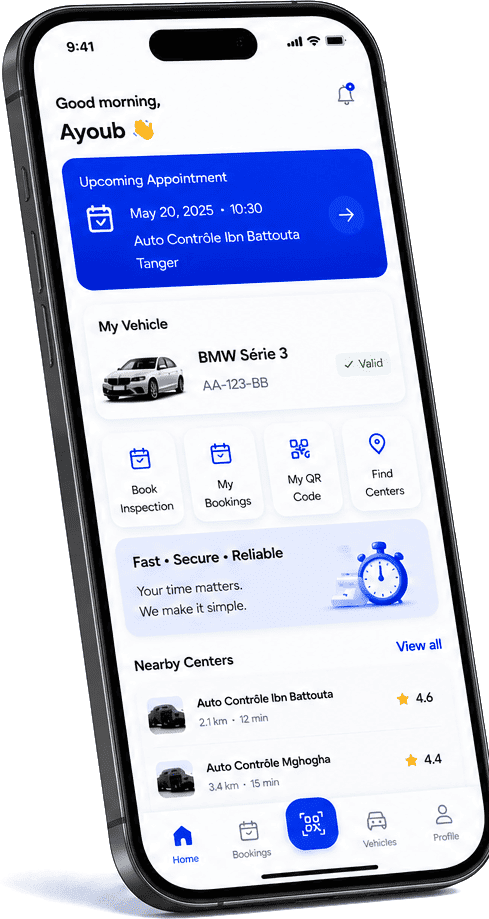
AUTOTICKEET app: driver home with upcoming appointment, vehicle, bookings, QR code and nearby centers.

My bookings

Each booking shows the vehicle, center, date, time and status.

UpcomingCompletedCancelledAll

Renault Clio

Tanger · Sep 12 · 10:30

Confirmed

Dacia Logan

Rabat · Mar 3 · 09:00

Completed

Demo

  • View details — at any time
  • Show the booking QR — for a confirmed booking
  • Reschedule — confirmed booking, more than 7 days before the appointment
  • Cancel — while pending or confirmed; refunded if cancelled more than 7 days ahead
  • See the result and leave a review — after the inspection

My vehicles

All your vehicles in one place, with their history and due dates.

  • Add a vehicle
  • Edit its details
  • View its record
  • See the next inspection
  • Get a due-date reminder
  • Use it to book

History · Renault Clio

  1. 12/09/2025

    Original inspection

    Repair required
  2. 20/09/2025

    Re-inspection

    Passed

Demo

Stay informed

You are notified at every important step of your appointment.

  • Booking confirmed
  • 24-hour reminder
  • Check-in recorded
  • Reschedule or cancellation
  • Inspection result
  • Counter-visit deadline
  • Refund
  • Slot released (waitlist)

All your notifications arrive in the app. Depending on your preferences, you also receive them by SMS, WhatsApp or email, with quiet hours you choose.

My payments

Your payment history: amount, date, related booking and status.

AT-2026-000412

Sep 12, 2026 · 39 MAD · CMI

Paid

AT-2026-000377

Mar 2, 2026 · 39 MAD · CMI

Refunded

Demo

A downloadable PDF receipt for every paid booking.

Your journey

Your AUTOTICKEET journey in 5 steps

From booking to result, every step is clear.

  1. 1

    Booking

    Choose your vehicle, center, date and slot.

  2. 2

    Confirmation

    Confirm your booking and pay the booking fee.

  3. 3

    Check-in

    Arrive at the center and scan its QR code.

  4. 4

    Inspection

    The agent performs the inspection and records the result.

  5. 5

    Result / Re-inspection

    View your result and, if needed, come back for a re-inspection.

Security

Your information stays protected

The mechanisms actually in place in the AUTOTICKEET platform.

  • Authentication

    Encrypted passwords and phone number verification by code.

  • Your account

    Password change and optional biometric login, from your Security settings.

  • Server-side validation

    Availability, payment and check-in are verified on the server; unsigned payment confirmations are rejected.

  • Secure QR codes

    Your booking QR contains no personal data; the center's QR grants no rights on its own.

  • Separated data

    Each driver can only access their own bookings, vehicles and payments.

  • Action history

    Key steps and every check-in attempt are recorded and time-stamped.

Driver app

Your vehicle inspection, made simple.

Book your appointment, arrive at the center and follow every step with AUTOTICKEET.

  • Approved centers
  • Secure CMI payment
  • QR code check-in
  • Tracking at every step
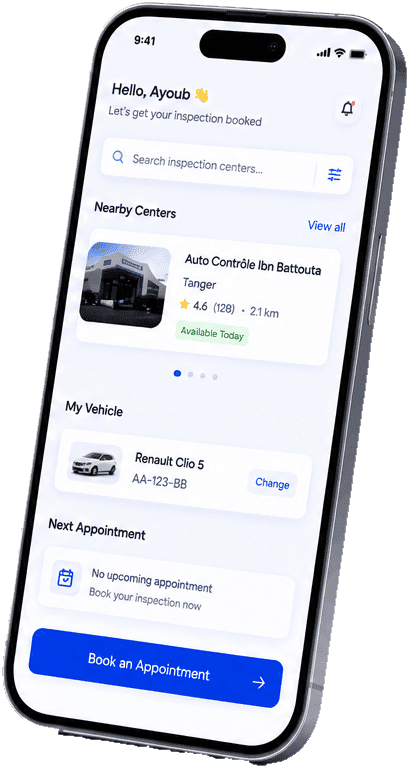
AUTOTICKEET driver app home screen: nearby centers, vehicle and booking.

FAQ

Questions from drivers

In the AUTOTICKEET app, choose your vehicle, a center, a date and an available slot, review the summary, then pay the 39 MAD booking fee by card via CMI. Your booking is confirmed as soon as the payment is validated.

Search for a center by name or city; with your location, nearby centers are shown with their distance. Each profile shows the address, opening hours, accepted vehicle categories, photos, verified reviews and available slots.

Each center displays its own permanent QR code at the entrance. Scanning it identifies the center; AUTOTICKEET then verifies your booking, its status, the vehicle, the date, the time and your rights before recording your arrival. The QR code is never enough on its own.

On the day of your appointment, from one hour before your slot until 45 minutes after. Outside that window, check-in is refused.

Yes — a confirmed booking can be rescheduled up to 7 days before the appointment date. Within the last 7 days, the date can no longer be changed.

Yes, while the booking is pending or confirmed. If you cancel more than 7 days before the appointment, the booking fee is automatically refunded to your payment method; within the last 7 days it is non-refundable.

The center records the result, the defects found and its notes, which you can see in your account. A counter-visit deadline is set, and you receive a reminder before it.

The center proposes a re-inspection date and time, which you accept in the app. This creates a new appointment linked to the original inspection: you check in again when you arrive, then the final result is recorded. The original inspection is kept.

In your account: "My bookings" (upcoming, completed, cancelled) and, for each vehicle, the history of its inspections and re-inspections.

The booking fee is paid by bank card via CMI. The slot is held for you for 10 minutes while you pay. The booking is only confirmed once the payment is validated; if it fails, the booking stays unconfirmed and you can try again. A PDF receipt is then available.

A booking costs 39 MAD. The inspection price itself is paid directly at the center.